Silver Pines Saving Guide: How to Save and What It Costs
How saving works in Silver Pines: payphone saves cost coins, two spots save for free, and the phone book code is randomized so you have to read it yourself.
FAQ
How do you save in Silver Pines?
What is the payphone save code in Silver Pines?
Is saving really locked behind money in Silver Pines?
Does Silver Pines support Steam Cloud saves?
Did the demo patch the save system?
How do you save in Silver Pines?
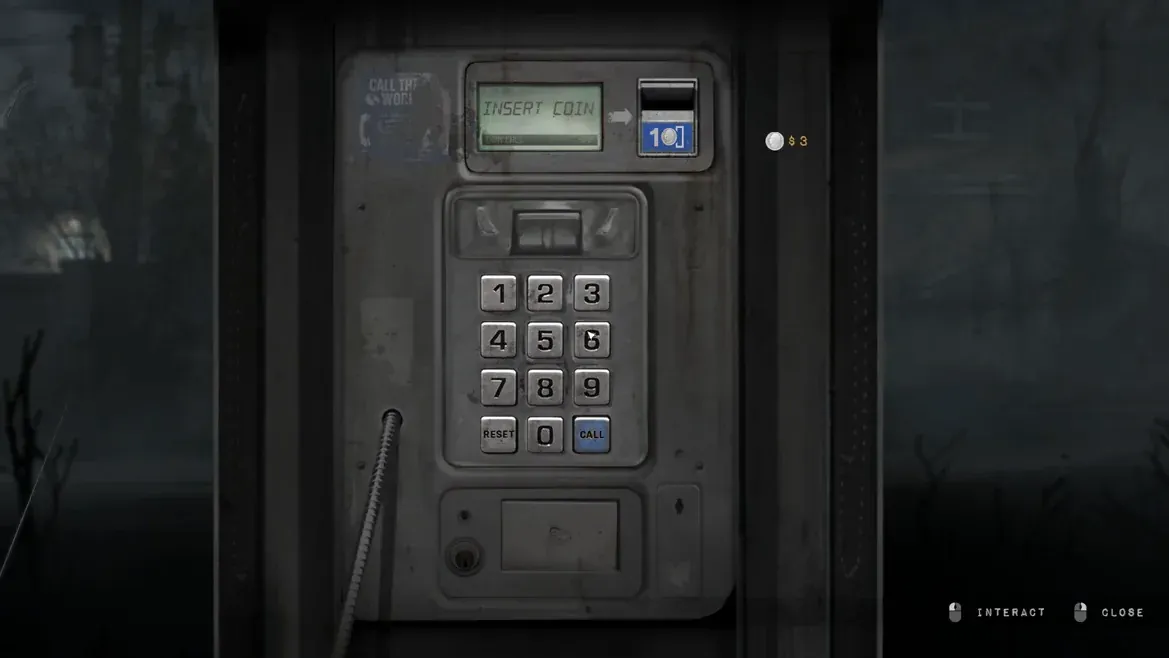
You save by using a payphone. Walk up to one, pick up the receiver, and dial the number printed in the phone book you are carrying. The save costs coins, which is the design decision that shapes the entire game’s pacing. You cannot save whenever you feel like it, and that is the point.
The developer framed the whole system as a deliberate variant on classic survival horror resource pressure. IGN and Bloody Disgusting both singled it out, with Bloody Disgusting calling it a clever take on the Resident Evil ink ribbon idea. Money is also what buys ammunition and healing from vending machines, so every save is a round of ammo you did not buy.
[!tip] Save with a purpose A save is not a checkpoint, it is a purchase. Save before a boss or before a long unexplored stretch, and skip it when you are five minutes from a free autosave.
What is the payphone save code, and why should you not copy one?
One recorded playthrough dialled 77221 to save. That number comes from a single player report on the Steam forums, and it may be useless in your run. When players asked how the phone system worked, the developer answered that there is more than one number you can dial and that you have to figure it out and manually dial it yourself in order to progress.
There is a second reason to distrust any digit list. A developer hands-off preview stated that the puzzles and codes are randomized between every run. If that is accurate, then the save number, the meat locker code, the motel guest code and the radio frequency all differ between playthroughs, and every existing guide that publishes fixed numbers is describing one recording rather than the game.
The correct method is simple. Open the phone book, read the number printed there in your current save, and dial exactly that. If a digit is hard to read on your screen, that is a known problem that Patch 1 addressed by enlarging the font. The payphone save code page walks through reading and dialling the number, and the demo puzzle codes overview explains the randomization warning across every code in the demo.
[!warning] Do not type a stranger’s code If you copy a number from a video or a guide and the phone rejects it, the game is not bugged. Read the number from your own phone book. This site never presents a single run’s digits as a universal answer.
Official source: Silver Pines on Steam describes managing scarce resources as a core pillar of the game.
How much does one save actually cost?
The developer has never published a price. The figure most players quote comes from a Steam forum thread where one player noted that 25 dollars was enough for about 20 saves, which works out to roughly 1.25 coins per save. Another player finished the whole demo having spent just one coin on saving and one on a newspaper, ending with about 23 coins left.
Those two reports are not contradictory. The first describes saving regularly; the second describes saving almost never. That gap is the actual lesson: the cost is affordable if you save sparingly and punishing if you save at every payphone you walk past.
| Reported figure | Source type | Confidence |
|---|---|---|
| About 1.25 coins per save | Player measurement, 25 coins for 20 saves | Medium, widely repeated |
| 1 coin spent on saves across a full demo run | Player report | Medium |
| Exact per-save price | Official | Not published |
Budget like this: keep at least five coins in reserve for saves, and treat everything above that as ammunition and healing money. If a vending machine is offering a heal bottle and you are sitting on fourteen coins, buy it. If you are sitting on four, walk away and find the free coin instead.
Where does the game save for free?
Two places in the demo save automatically and cost nothing. The first fires right after the opening payphone call where your client tells you to find Eddie Velvet. The second sits immediately before the tunnel boss fight. A player confirmed the boss-side one directly: there is one autosave before the boss fight that does not spend a coin.
That second free save changes how you should play the final stretch. You do not need to buy a save before the tunnel. Walk into the fight, and if you lose, you reload at the autosave with your coins intact.
| Save point | Cost | When it matters |
|---|---|---|
| Opening client phone call | Free autosave | Right after you leave the diner |
| Before the tunnel boss | Free autosave | Do not buy a save here |
| Any payphone | Roughly 1.25 coins | Use before long exploration |
The diner and town walkthrough marks where the first free save lands, and the tunnel boss guide covers the second.
Where do you find more coins?
Coins are scattered through the town and inside containers, and some come from smashing scenery rather than from pickups. The most reliable and most overlooked source is the payphone itself. Every payphone has a coin return slot, and it always contains one free coin. Patch 2 specifically made that coin easier to see, which tells you how many players were walking past it.
Two more habits pay off. Search the same room twice, because the demo hides coins behind objects and above sightlines. And check vending machines even when you are not buying, since the surrounding area usually holds loose change.
[!note] The free coin is not a one-time trick The coin return slot is part of the phone booth furniture, not a puzzle. Check it every time you use a phone, including the ones you only visited to read the number on the wall.
Why do players argue about paying to save?
Because it is genuinely divisive, and the demo’s Steam forum shows both sides. One long thread is titled “Save mechanic is good but…”, and another is bluntly titled “Why are we still doing this?” Players also asked, in the same thread, for an accessibility option granting unlimited saves. One player put the objection plainly: why can the game not just let you pick up the phone and press a button?
The defence is that scarce saves create the tension the rest of the design is built around, and the developer’s own comments about real-time stress support that. What you should take away as a new player is that neither position is unreasonable, and you can largely sidestep the argument by leaning on the two free autosaves and only paying when you are about to risk something expensive.
Does Silver Pines support Steam Cloud saves?
Yes. PCGamingWiki lists Steam Cloud among the game’s supported features, and the Microsoft Store version supports Xbox Cloud saving instead. That means your progress follows your account between machines, but it does not mean your demo save follows you into the full game.
The developer explained in August 2026 that parts of the save system had been reworked to be future-proof for patches, that this work did not exist when the demo launched, and that the demo save therefore will not carry over. The reasoning was technical rather than a design choice. If you are deciding whether to replay the demo near launch, the demo save transfer page lays out what does and does not move.
What changed in the demo patches about saving?
Patch 1 enlarged the phone book font. The request came from a player who lost an entire first playthrough because the telephone number was too small to read properly, and the developer replied that this was not the first report of the problem and that the patch included a bigger font for the phone book. Another player in the same thread admitted they had read 77221 as something like “7722)” and could not work out why the phone refused to save.
Patch 2 did not change the save rules, but it made the free coin in the coin return slot more visible and fixed a bug where the ‘Healing’ status icon stayed on screen after dying and reloading. The public demo shipped two patches, so if you see a longer list quoted somewhere, check the Steam news hub for the primary source rather than trusting a static summary.
The lesson from Patch 1 is worth internalising even now. If a code will not go through, the failure is usually reading, not logic, and the fix is to zoom in on the source in the world rather than searching for a different number online.
Related
Related Articles
bosses
Silver Pines Bosses: Every Boss Fight and Enemy Type
Every boss fight and enemy type confirmed in the Silver Pines demo, how far each community name can be trusted, and the one officially named enemy.
bosses
Silver Pines Tunnel Boss Guide: How to Beat the Demo Final Boss
How to beat the Silver Pines tunnel boss, the demo's final fight, including the shadows, the developer-confirmed demo problems and the community no-damage pattern.
guides
Silver Pines Beginner Guide: First Hour Tips and Systems
A Silver Pines beginner guide to the opening diner, the camera, coins, crouch stealth, the short stamina bar, healing animations and demo length.
Was this helpful?
Thanks for the feedback!