Silver Pines Map and Camera Guide: How Navigation Works
How the Silver Pines map works, why you press up and down to turn, and how the camera lets you pin photos onto the map as notes and reminders.
FAQ
How does the map work in Silver Pines?
What does the camera do in Silver Pines?
Does the Silver Pines map show locked doors and clues?
Why did my map never reveal in Silver Pines?
Is there fast travel in Silver Pines?
How does the Silver Pines map work?
It is a 2D map of a town that has depth. The game is a side-scroller, which makes it look flat, but the map is drawn and read the way you would read a plan of a real place: there are routes that go behind and in front of what you can see, and the way you reach them is by interacting with openings rather than by walking to the edge of the screen.
Official source: Bloody Disgusting Silver Pines preview
The most useful way to think about it is that the demo’s town is a metroidvania laid on its side, which is how the developers described it. CGMagazine recorded the team calling the town a metroidvania tower lying down. Reading the map as a stack of connected rooms rather than a left-to-right corridor is what makes navigation click.
Official source: CGMagazine Silver Pines first look
How do you turn corners on the Silver Pines map?
You press up or down when the background offers an opening. That is the whole mechanic, and it is the single most common thing new players do not realise.
If you have been walking the demo as a straight line and wondering why the map shows rooms you have never entered, the reason is usually a doorway or gap in the background that accepts an upward or downward input. Areas that look decorative often are not. The developers’ own design motto for the spaces is that if you can see it, you can go there.
Official source: 80 Level interview with the Wych Elm co-founder
The camera and the map are the two halves of the same idea. You turn a corner, you find something you cannot use yet, and you record it so that when you do have the tool you know where to come back to.
How does the camera work in Silver Pines?
You take a photo, and the photo gets attached to your map. It is not a photo mode and it is not a collectible system. It is a note-taking tool.
Official source: Wikipedia: Silver Pines gameplay summary
The demo leans on this hard because it does not use quest markers. Codes are derived from things you read in the world, and the camera is how you carry that information across rooms without writing it down on paper. A developer hands-off preview described a puzzle where the code is tied to the prices in the local flower shop, meaning you have to photograph the shop’s prices and compare them later when you reach the lock.
Official source: Kyusai Media developer preview
That is the intended workflow in miniature. Look at the clue, photograph the clue, walk to the lock, open the photo, enter the number. Any puzzle in the demo that asks you for four or five digits is a camera puzzle whether it announces itself as one or not.
What does the map track for you?
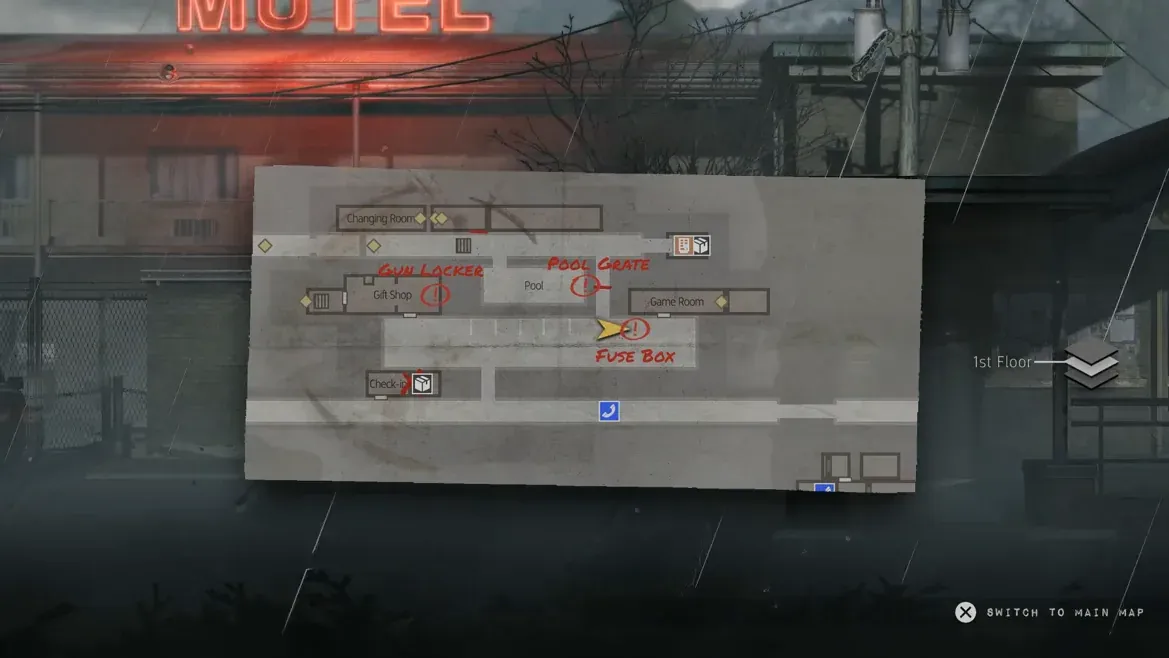
The map keeps track of where you are and what you have found rather than telling you where to go. Published descriptions say it marks your last known position, locked areas and clues you have discovered.
| Map element | What it tells you | Why it matters |
|---|---|---|
| Last known position | Where you currently are | Orients you after a long detour through back rooms |
| Locked areas | Places you could not open yet | Becomes a shopping list once you have new tools |
| Clues | Points of interest you have found | Replaces quest markers entirely |
| Attached photos | Whatever you chose to photograph | Lets you carry a code or diagram between rooms |
| Background openings | Routes deeper into the town | Press up or down to use them |
The consequence of this design is that your map is only as useful as your note-taking. A player who photographs everything ends up with a map full of hints. A player who photographs nothing has a map that tells them where they are and nothing else.
[!tip] Photograph anything that looked important but refused to open Locked boxes, padlocked cages, the concrete wall near the lighthouse and the cracked rock face in the lower right of the map are all worth a photo. None of them open in the demo, but the full game will give you the tools, and a photo pinned to the map is how you remember to come back.
What is the map reveal mechanic?
The map reveals itself rather than being fully visible from the start, and that reveal animation caused a bug in the original demo build. Closing the map while it was revealing could stop it from ever revealing, leaving you with a map that stayed blank.
Official source: Silver Pines Steam news and patch notes
Demo Patch 2 on June 12, 2026 fixed the map reveal issue where closing the map during the reveal caused the map to never reveal. The same patch also improved world interaction prompt legibility and made interactable objects such as ladders easier to identify, which suggests the developers knew the navigation layer was doing too much work with too little guidance.
[!note] If your map stayed blank That was a demo bug, not something you did. It is fixed in Demo Patch 2 and later. Update the demo rather than restarting your run, because a blank map is a display failure rather than lost progress.
Why does the environment do so much of the navigating?
Because the game wants you to read the town rather than follow an arrow. The demo uses real signage inside the world, which reviewers highlighted specifically, and those signs carry information that would otherwise sit in a HUD.
Official source: Game8 demo review
This is where the map, the camera and the signage combine. A road sign tells you which way the pharmacy is. A note inside a building tells you a code fragment. Your camera stores the fragment. Your map stores the location of the lock. None of the three alone solves anything, and all three together replace the quest log that the game does not have.
The practical habit to build is to read before you move. When you enter a new screen in Silver Pines, look for signs, read the notes on the walls and photograph anything with numbers on it. Players who skip that step end up asking on forums where to go next, which is one of the most common categories of post about the demo.
Why did the developers say the map was a breakthrough?
Because a metroidvania with a town this dense lives or dies on whether players can hold it in their heads. In an interview about how the project came together, the developers said that a key thing for them was to get the map into decent shape.
Official source: Shacknews Silver Pines interview
That is a candid admission about design priorities. The team’s previous work included a metroidvania with a compact, readable world, and the map is the piece that makes a town-sized version of that idea navigable without a minimap full of icons. It also explains why the map, rather than the combat, is one of the first things reviewers mention as working well.
The demo’s route structure rewards people who use it. The diner and town walkthrough covers the opening areas where the camera and the payphone are first introduced, the Crimson Bear Motel walkthrough covers the densest interior in the demo, and the town areas and shortcuts page lists which places you can actually reach before the demo ends.
Is there fast travel in Silver Pines?
Unconfirmed, and nothing about the demo suggests it. What is confirmed is the ferry, which you call from the ferry office radio near the end of the demo, and the cable car, which the official materials reference for the full game but which players could not find an entrance to in the demo.
Official source: Steam forum thread asking where the cable car is
Until the full release answers that question, plan on walking and on using the shortcuts the map reveals. That is another argument for marking every locked door and blocked route you pass, because in this game a shortcut you have forgotten is a shortcut you do not have.
Related
Related Articles
bosses
Silver Pines Bosses: Every Boss Fight and Enemy Type
Every boss fight and enemy type confirmed in the Silver Pines demo, how far each community name can be trusted, and the one officially named enemy.
bosses
Silver Pines Tunnel Boss Guide: How to Beat the Demo Final Boss
How to beat the Silver Pines tunnel boss, the demo's final fight, including the shadows, the developer-confirmed demo problems and the community no-damage pattern.
guides
Silver Pines Beginner Guide: First Hour Tips and Systems
A Silver Pines beginner guide to the opening diner, the camera, coins, crouch stealth, the short stamina bar, healing animations and demo length.
Was this helpful?
Thanks for the feedback!